Guitar design
I’ve been making some layouts for a few guitars I have in mind. There are a lot of different concerns that come up when designing the routing templates. I’m using OpenScad for most things, but then the shapes themselves are a more organic process involving Inkscape and hand drawing.
A few of my designs have been inspired by other guitars. I will scale an image up to life-size and print it out. I’ll then physically draw on the printout and change some curves and maybe cut the templates with scissors. It’s about getting a new feel for a shape here. Then I’m basically taking a photo and creating an SVG from the shape using Inkscape. Sometimes the photo trace tool does ok, but many times I have to just go around it manually and add points.
This is a kind of squishy process. I end up running into limitations of the tools with respect to scaling factors, units and file formats. There is a workflow here that is working for me now but it’s not very streamlined yet. I need to produce a series of routing templates on the laser cutter in DXF format. I’m using OpenSCAD as the final output generator and LightBurn as the laser cutting software.
Two basic things have to come together to form the templates: the hardware layout and the body shape. Some interesting things that come up here are where should the origin be? I have decided that maybe the origin should be the neck joint. Somehow it seems like the bridge position might be the logical origin point but most of my thinking so far has been around where the heel of the guitar is. I don’t know if this is right yet. I want to be able to use the same code for different scale lengths and different types of bridges. I want to be able to take a template for a Jaguar type guitar and use it for strat eectronics.
Some other unknowns are which templates are really needed and if there is a routing order that makes sense. I made one prototype by hand and ran into some issues mostly with screw placement and hardware angles. It’s hard to line things up even with a center line marked on the guitar. You end up needing a square to mark things out and on my first one I ended up using the guitar strings to try to center things up and keep it on track, which is a total pain. You have to string at least the first and 6th strings and keep the neck flopping around attached to the body by 2 strings while trying to drill more holes.
Most necks come un-drilled, so getting the neck angle set in straight is harder than it sounds. I’m not sure what the solution to this is yet. So far I have been able to get the neck pocket very tight so I was able to kind of set the neck in with a rubber mallet and tap it around with the strings in place to get it just right. Once it’s set I drilled holes and screwed the back plate on.
Another snafu was the jack plate. This happened due to the way I routed the edge of my guitar body. I need an accurate way of locating this hole still.
This post turned out to be just a random string of thoughts on what I have gone through so far rather than any sort of cohesive thing, I apologize if you are still reading here. A ton of ad-hoc thoughts and processes have come about as a result of my building a prototype and I’m still trying to come up with a repeatable way of building the guitar efficiently in a way that I will be able to manufacture a run of say 10 instruments myself without taking a year to do it.
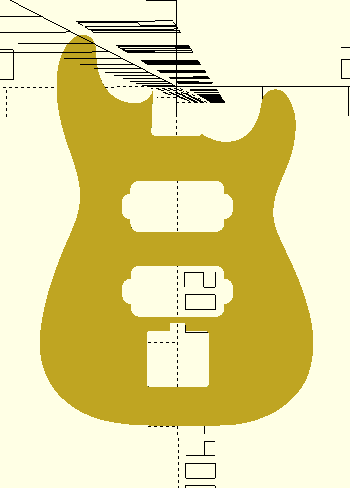
This is what the template looks like when applied to a random Strat outline that I downloaded. It’s parametric so I can specify where each component goes on the center line, but I’m still looking into how to automatically figure out where the neck pocket and bridge position need to go based on the scale length and the neck. One template I found marked the position of the 21st fret so maybe that’s common in the luthier world. Ideally I’d like to take a random outline, establish a centerline and be able to play with positioning in a way that will always produce a playable instrument. I need to figure out a critical measurement for a given neck that I might buy so that the scale length works out. I was a little perplexed the first time I bought a neck and it didn’t have any holes drilled in it. So it’s a design decision how deep in to set the neck really and even where to drill it.
One other thing that I found unexpectedly difficult was drilling the bridge pin holes. They have to be dead-on for the bridge to fit down over the pins and they have to be exactly the right distance away from the nut for the intonation to be correct. Well, the latter isn’t totally true, since the bridges can generally be adjusted and each string requires some fine adjustment anyway. The former was hard and I screwed it up twice trying to do it even with a drill press. I ended up filling the holes in with dowels and trying again. Even with a press, I needed brad-point drill bits to get the center correct and they had to be marked perfectly with a punch first. Also the bridges I was using didn’t have any data so I was measuring everything with a caliper.
So, I really want to avoid drilling these holes entirely and I’m hoping that I can route them along with everything else since they are generally a larger diameter than my routing bits.
The last thing is the neck pocket. If I want to use a single routing template I have to make some kind of removable piece for the outer route vs the pocket. And the drill holes. If I use two templates then I need indexing holes or something to line the templates up with. I really want to be able to do this stuff with a single template. Also want to transfer the drill holes to the neck somehow from the template. Probably through transfer punches in the guide holes.
Creating drawings in Inkscape requires changing the units in the “drawing” menu and rescaling the image. It took me a while to get this right but it seems repeatable for getting svg files that can be used in OpenScad with correct dimensions.
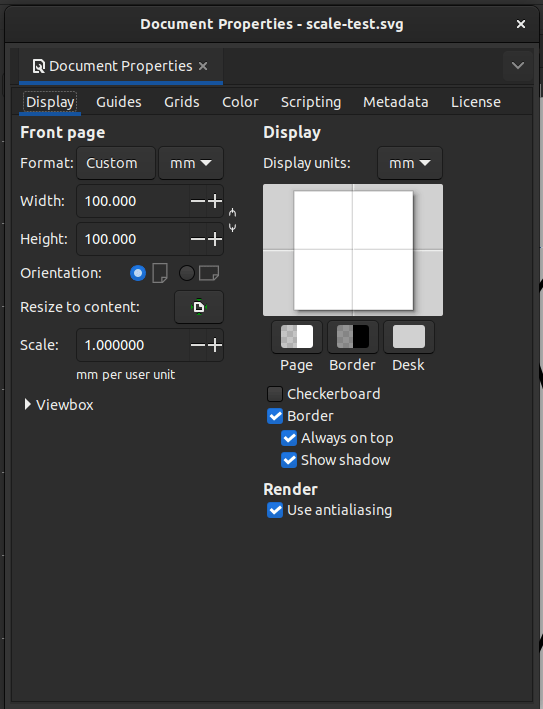
The critical detail here is the “resize to content” and the scale factor. For my system the scale factor was 0.26 approximately. It seems to be automatically calculated by Inkscape and seems to work. The default unit seems to be the pixel.
BTW I’m publishing this code as a project called grout https://github.com/dnewcome/grout