Live PA configuration with FL studio
I’m playing around with a few different setups for my upcoming live PA stuff. I’ve been using FL Studio since back in the v1.0 days and I’ve discovered recently that it has a new live mode that is in the upcoming 10.5 beta. However I also wanted to give it a try using the playlist marker automation method also. Here is what I came up with.
I configured my Behringer FCB1010 with 2 different banks of MIDI notes. The first bank is just a chromatic keyboard starting at F2. The second bank starts at C4 and is designed to automate the playlist markers when live mode is enabled.
You can grab my sysex file for this setup here.
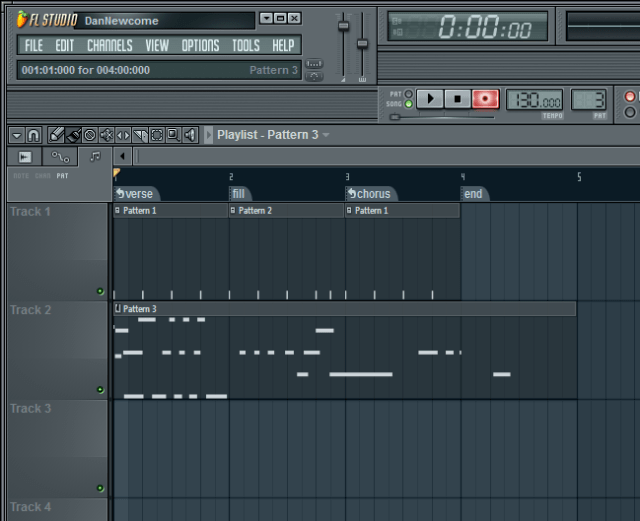
There are several different types of markers available in FL Studio. The way I ended up doing things was to create alternating loop markers containing the main song part and then I put a non-looping marker in between the sections as transitions. This makes it easy to step through the song using the increment marker button. You basically let the section loop while playing over it and then when you are ready to move on, hit the next marker pedal and it plays the fill and drops directly into the next song section.
I wanted to use the pause marker to do some breakdowns where I’d just let the tempo freewheel for a little while, but in order to get the song playing again you have to hit play again after it hits a pause marker. This means that I’m going to have to set up one of my foot pedals as a play/pause button. I’m going to leave that for a little bit later though.
Stepping through a song is pretty effective this way. I think I’ll be able to live with only being able to directly access the first 5 markers on my pedal. Presumably I’d want to step through the song initially and then maybe go back to the bridge or chorus section for a reprise. As long as those sections are toward the beginning of the song it should be accessible directly using the pedal. However, I could just backstep through the sections since nothing starts playing immediately. It waits until the currently playing section has finished playing before the song position pointer actually moves.
This makes it impossible to comp sections or re-trigger things on the fly, but perhaps that should be done using a sampler Vsti or something like that.
One other thing that I wanted to be able to do was to do loop record. There are two things that keep me from realizing this in FL Studio currently. First is that there is no destructive quantize. That is I can’t quantize my playing on the way into the sequencer. That means I have to be really really precise in order to get something that is going to be able to be looped for a few minutes without being cringe-inducing. The second thing is that the replace mode is a little off when you are playing live. The way it works is that you have to be actively playing notes in order for the old stuff to be overwritten. You can’t “record” silence over top of existing material. Also, when you are playing if you want to drop out and have the rest of the loop play out you have silence until the loop repeats. I understand that in order to make this work the way I want it would mean that you’d have to use a punch-out pedal or some way of telling FL that you are finished playing. Lastly there is a little bit of awkwardness at the beginning of the loop when it repeats. If you are playing (holding) a note, it will be cut, and the beginning of the existing material will sound for a fraction of a second. This makes the loop sound awkward when you are actively playing material during the time that it loops around.
I understand that FL isn’t really designed for this, but maybe I’ll be able to find something or write something that works the way I want it to.
I’ve found that when recording it’s best to just do it all on one pattern per playlist track. See my screenshot for details:
The last thing I’d need to make this work would be a way of switching between tracks with the pedal. I think I should be able to program the FCB to do a series of messages that would switch FL to a new generator and change patterns to a different pattern. Not sure how well this will work yet, I’ll keep you posted.