Network audio using netjack – part 1
I’ve been playing with networked audio again after some previous unsatisfactory attempts at getting something working using pulseaudio and RTP streaming. I tried a few things in the past like using PD’s netsend~ object but nothing gave me decent results.
I tried a few things this time around like Wormhole which is a VST plugin that lets you do client-server networked audio between the points that you have inserted the VST in your host.
This didn’t work well at all, the audio was garbled and I got lots of timeouts and disconnects. I tried adjusting the buffers and other settings, but it didn’t seem likely that I was ever going to get satisfactory results.
I’ve been kind of avoiding Jack on platforms other than Linux up until this point, but I feel like I’ve exhausted all my other options. I’ve gotten Jack installed on my Mac and on my Windows 8 machine, and my goal is to be able to route audio between them.
Understanding how Jack works on Windows is a little tricky by itself, so I’m going to get this part working first, then I’ll get the networking part of it happening. I’ve already jumped ahead a little to make sure I can establish a network connection with Jack, but I’m not at the point where I’m actually getting audio across the connection.
On Windows, installing installing Jack using the installer for 64 bit Windows. The install went as expected and I was able to run the “Jack Control” (aka qjackctl) UI. The server started using the portaudio driver, so that’s a good first step.
I’m using Reaper as my DAW on both ends. One thing that wasn’t so clear to me from reading the documentation was just how Jack was supposed to communicate with my sound card in Windows. There aren’t any ASIO options in the Jack setup. It turns out that there is something called JackRouter that lets ASIO-capable hosts see the Jack server. JackRouter is not a separate program or client that is run. It starts along with the Jackd executable process. This was a little confusing to me, as I was looking around for an executable called jackrouter.exe in the same vein as the jacknetsource.exe and others.
Another confusing part was that 64 bit versions of Reaper don’t seem to see the JackRouter in its ASIO setup. Once I reverted back to 32 bit Reaper I was able to see JackRouter in my list of ASIO drivers alongside ASIO4ALL. I noticed that the jackd.exe process was a 64 bit process and that there were 2 different versions of JackRouter.dll, and that reaper had the 32bit version open.
You can see in the following screenshot from Process Explorer that it is the reaper.exe process that loads JackRouter.dll, and not Jackd.exe. I’m not sure which dll gets registered as an ASIO driver in Windows, or even how this lookup process works at all.
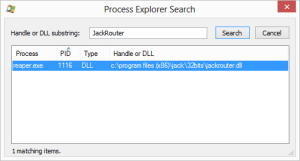
This might be a clue as to why 64 bit Reaper doesn’t pick up JackRouter.dll though.
In Reaper, if I have ASIO set as the audio system and JackRouter selected as the ASIO driver, I can play audio from reaper to my built-in sound device. It looks like Jack automatically routes the audio from Reaper to the hardware output device. Note that if Reaper isn’t actually playing, its output don’t show up in the connections window! This was another point of confusion in this configuration.
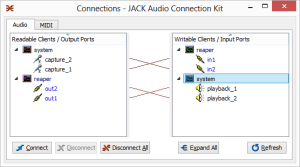
At this point I’m pretty happy to be hearing sound, but I’m wondering what the latency is like when running this way, and I’m not sure what portaudio is using under the hood for audio output. I’m thinking it’s not using ASIO, but rather WDM.
The next step then is to run the Jack server using some particular settings to try to force ASIO. There are some hints about this here on the Jack site. Running the server like the following will start up ASIO4ALL when starting Jack:
C:\Program Files\Jack\jackd.exe" -R -S -d portaudio -d "ASIO::ASIO4ALL v2"However Reaper is reporting 512 samples of latency regardless of how I set the latency in the ASIO4ALL configuration interface. Looking at the help for the portaudio driver I found that setting the frames/period setting when specifying an ASIO driver will take the buffer size specified in the ASIO settings – ASIO4ALL in this case. Effectively this means that the last buffer size specified in the ASIO4ALL control panel will be used.
C:\Program Files (x86)\Jack>jackd.exe -d portaudio --help
jackdmp 1.9.9.5
Copyright 2001-2005 Paul Davis and others.
Copyright 2004-2012 Grame.
jackdmp comes with ABSOLUTELY NO WARRANTY
This is free software, and you are welcome to redistribute it
under certain conditions; see the file COPYING for details
Drivers/internals found in : C:\Windows
Drivers/internals found in : C:\Windows
 -c, --channels Maximum number of channels (default: 0)
 -i, --inchannels Maximum number of input channels (default: 0)
 -o, --outchannels Maximum number of output channels (default: 0)
 -C, --capture Provide capture ports. Optionally set PortAudio device n
ame (default: none)
 -P, --playback Provide playback ports. Optionally set PortAudio device
name (default: none)
 -m, --monitor Provide monitor ports for the output (default: false)
 -D, --duplex Provide both capture and playback ports (default: true)
 -r, --rate Sample rate (default: 44100)
 -p, --period Frames per period. If 0 and ASIO driver, will take prefe
rred value (default: 512)
 -d, --device PortAudio device name (default: none)
 -I, --input-latency Extra input latency (default: 0)
 -O, --output-latency Extra output latency (default: 0)
 -l, --list-devices Display available PortAudio devices (default: tr
ue)
Adding the -p flag to our configuration looks like this:
"C:\Program Files (x86)\Jack\jackd.exe" -R -S -d portaudio -d "ASIO::ASIO4ALL v2" -p 0Running, we get the following output. Notice the “ASIO preferred buffer size”:
jackdmp 1.9.9.5
Copyright 2001-2005 Paul Davis and others.
Copyright 2004-2012 Grame.
jackdmp comes with ABSOLUTELY NO WARRANTY
This is free software, and you are welcome to redistribute it
under certain conditions; see the file COPYING for details
Drivers/internals found in : C:\Windows
Drivers/internals found in : C:\Windows
JACK server starting in realtime mode with priority 10
ASIO minimum buffer size = 64
ASIO maximum buffer size = 2048
ASIO preferred buffer size = 128
ASIO buffer granularity = 8
InitTime : multimedia timer resolution set to 1 milliseconds
Everything seemed like it was working pretty well at this point, so I was wondering if I was getting true 128 sample latency like I was without Jack. From the Jack FAQ:
> There is NO extra latency caused by using JACK for audio input and output. When we say none, we mean absolutely zero. The only impact of using JACK is a slight increase in the amount of work done by the CPU to process a given chunk of audio, which means that in theory you could not get 100% of the processing power that you might get it if your application(s) used ALSA or CoreAudio directly. However, given that the difference is less than 1%, and that your system will be unstable before you get close to 80% of the theoretical processing power, the effect is completely disregardable.
So apparently we burn a little more CPU, but the latency is no larger. This is good news.
Now, on the Mac side of things – I was able to get Jack installed using the Snow Leopard installer package. I’m using OSX 10.8 (Mountain Lion).
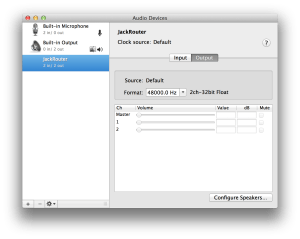
I was able to select the coreaudio driver in the setup page of qjackctl and start the Jack server from there. In Reaper, the JackRouter device shows up in the list of audio devices. JackRouter also shows up as an audio device directly in the OSX Audio and Midi setup application.
Setting the buffer size can be done in the Jack server setup by chaging the value of “frames/period”. Note that this buffer size isn’t affected by the “request block size” setting in the Reaper host.
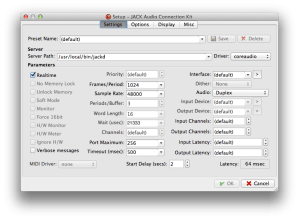
The following screenshot shows JackRouter listed as an audio device in Mac audio and MIDI preferences:
At this point I have low-latency audio running through Jack locally on each host (Mac and PC) using their respective audio systems (CoreAudio and ASIO) with the ability to set the buffer size, and thus the latency.
Part 2 will focus on actually getting audio out over the network using the network portion of Jack (NetJack).