Pedal Fighter Pure Data patch
In a previous post, I described the physical build process for the Pedalfighter project. I have now played around with getting the software setup going using PD.
The process of getting the PD patch working was complicated by lack of documentation on how to work with MIDI messages beyond using the built-in makenote object. The makenote object takes care of creating note on/note off pairs. It takes a note duration as an argument and uses that to schedule the note off event.
In the case of the Pedalfighter, I want to be able to hold a note down for as long as the button is depressed. This means I have to be able to send the note off messages separately, which means I can’t use makenote.
Looking around in the help files and documentation, I found a midiout and a noteout object. The documentation on these is a little sparse, but I figured out that noteout is the most general object, and can send pretty much any MIDI message, provided that you format it correctly. Noteout can send note on and note off events. This is what we need.
In order to use noteout, we give it a note number and velocity value. The note number is provided to the leftmost input, and is the “hot” inlet. Hot and cold inlets are a PD concept that boils down to whether or not an object computes its outputs when a given inlet changes. This just means that we have to pay attention to the order that we give the arguments in. We need to give noteout the velocity value first, and then the note number. Once it receives the note number, the MIDI message goes out to the MIDI device.
So the arduino sends data from its outlet and it is up to us to use a combination of route, unpack, and moses to get the data formatted and sent to the midiout object. PDuino sends a stream of labeled messages, and the one we are interested in is called “digital”. These messages consist of a tuple containing the pin number and the pin value. The pin value when in digital mode will be 1 or 0 depending on whether or not the pin is high or low. We can use unpack to split the tuple into separate values, one value on each of unpack’s output ports.
In order to send the appropriate MIDI message, we have to split the data depending on whether we are seeing a 0 or a 1 value. We do this using the moses object in PD. Sending a note off is done by sending a zero velocity to noteout.
In addition to splitting the data for note on/note off, I have split the data for the pin number as well. The reason for this is that I was getting spurious data from the unconnected digital pins on the Arduino. I’m sure that there is a way to deal with this in the firmware, and in the final version of the Pedalfighter I’ll do it there, but for now this is a good way to keep phantom notes at bay.
The basic patch looks like the following:
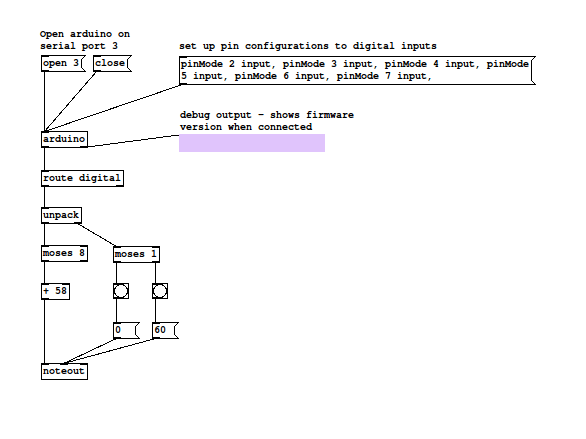
For the final version of the project this should be more generic, like not assuming which TTY the Arduino is on, but you get the idea.