Troubleshooting the Casio DG-20 fretboard
I’ve owned a Casio DG-20 for a few years now, and while I play it every once in a while, it hasn’t been one of my main instruments. However, I’m interested in using it as a controller for my livepa rig so I wanted to get it set up better. This includes fixing some dead frets and straightening the neck.
I’m going to leave the neck straightening process for another post, partly because I haven’t actually finished doing it yet but also because I want to focus more on getting all of the frets to work correctly first.
When I first took my guitar apart I found that the ribbon cables that connected the fretboard to the rest of the guitar were pinned between the neck and the body of the guitar at the heel of the neck. I assumed that this was the cause of my malfunctioning frets. However, the cables tested out fine with the meter, so it must be something else.
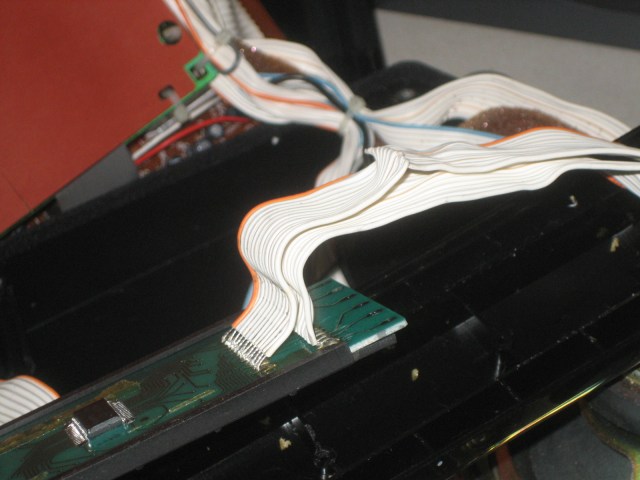
I figured that since I was having issues with some adjacent frets playing the same notes, that the common wires between the frets must be shorted out. This turned out not to be the case, as I tested different combinations of connections involving the frets in question and there were no shorts. In any case, thinking about the observed behavior a little more, it would seem that a short would cause a skipped note rather than a repeated note. It would make sense that there would be an open circuit though, and that the previous fret was physically still pressed down when the next-higher fret is pressed, causing the previous fret to continue to sound.
The DG-20 uses a scanned key matrix mechanism to register key presses. This basically means that the controller circuitry pulls one of the “string” signals high and then reads the fret that is pressed.
I don’t want to spend too much time digging into exactly how this works, but suffice it to say that we can emulate how the CPU reads the fretboard by using a multimeter.
First, check out the fretboard by playing each note on the guitar and noting whether there are any spots that don’t play correctly. I suspect that if there are two adjacent frets that are dead, you will get a completely dead spot on the neck. If there is a dead fret immediately following a working fret, the note will be repeated as you play up the fretboard.
One important thing to notice is whether all strings on a fret are affected. If every string is affected we most likely have a break in the “common” signal for the fret.
The procedure for testing once the fretboard has been removed from the guitar is to connect one meter lead to the common wire for the fret and then probe the six fret contacts to see if they are good. Note that since there are diodes involved, we have to have the meter connected in the correct orientation. The red DMM lead should be connected to the common wire for the fret.
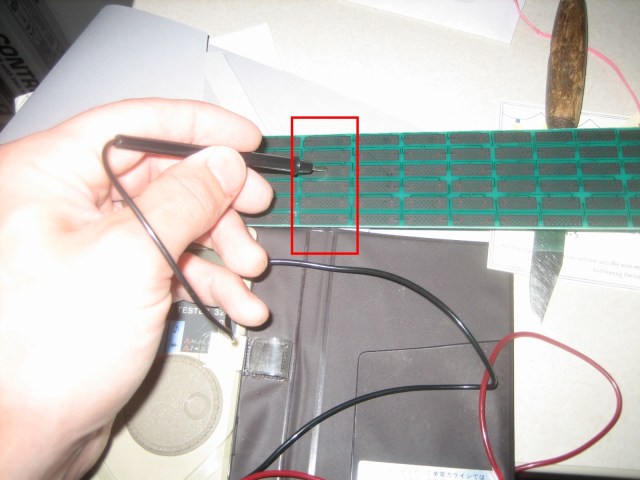
Note that there is clear lacquer covering the pins of the diode chips making it difficult to probe with the meter. If you have sharp points on your probes, you can probably scratch down under the lacquer for at least the common connections. However, I’d recommend using a bit of wire in the connector for testing the common fret wires and probing the fretboard contact surfaces with the meter to test.
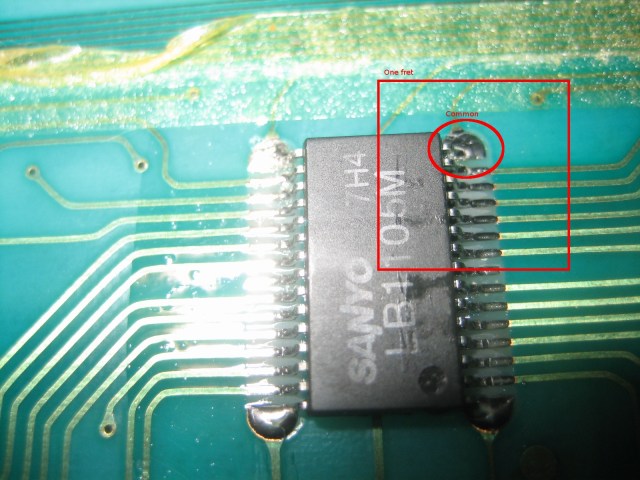
As a side note, if there are some fingering positions that don’t work correctly but other positions on different strings but on the same fret are ok, the issue is probably the individual connection rather than the “common” wire to the diode chip.
Hopefully this helps you troubleshoot any malfunctioning notes on your DG. I want to point out that my theory on why the solder connections seem to be so vulnerable to breaking is that if the neck flexes a lot like mine does (broken truss rod inside) it takes quite a toll on these solder joints. This could be an issue if the guitar was ever banged or dropped such that then neck was jarred sharply or flexed.