Using a Rock Band keyboard with the QinHeng USB MIDI adapter
Long title, I know, but I’m going go into details on just what it says on the tin. As you may know, the new Rock Band 3 game has a keyboard controller that has a real MIDI port on it, allowing it to be used as a controller for making music in your favorite sequencing program. I saw these things on Newegg for 30USD shipped so I had to give it a go. Previously Create Digital Music ran a post on using these things for music production and they were suitably impressed even at an 80USD price point.
I got my keyboard the other day and did a partial tear down just to see how the action was designed, among other things. The details of that will be in a future post here on the ‘strukt blog. I’m impressed with the quality of this thing. The case feels more solid than my Edirol PCR-30 and the keys feel almost as good. They still don’t have the “breaking” key feel that the Edirol does, but then most other controllers don’t either. I would rate the keys on the RB keyboard certainly above my Yamaha CS1x if that gives you some idea.
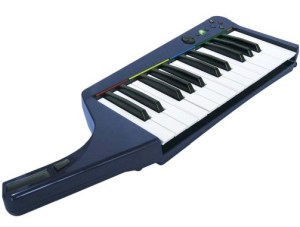
So back to using the MIDI port on the Rock Band keyboard (henceforth, referred to as the RBK in this post). It turns out that on the PS3 version that I bought, MIDI mode is entered when the RBK senses that a connection has been made to the MIDI port. This functionality works fine when connected to one of my normal MIDI devices like the Yamaha CS1x or the MIDI input on my PCR30. However, with the QinHeng (referred to as QH from this point on) I couldn’t get the RBK to switch into MIDI mode, but I noticed in MIDI OX that I saw that the QH was receiving MIDI active sense messages from the RBK. So some kind of data transfer was working, I just couldn’t get the keys to send note messages.
After trying to figure out a way to force the RBK into MIDI mode by looking on the Web to see if there was some kind of manual override I stepped back and thought about how the MIDI sense probably worked. I figured that since MIDI was a balanced current loop and the RBK would send periodic active sense messages out regardless of whether it was in MIDI mode, the RBK probably tried to sense whether current was flowing in the loop. On the other end, I figured that the QH probably didn’t properly implement the MIDI spec with respect to using an opto-isolator and was probably using a high-impedance input like an op-amp which wouldn’t draw enough current to enable the RBK MIDI mode.
I found out through some other experimentation that the QH doesn’t even use the other end of the TX loop, but rather it uses the shield line as a signal ground. This means that no current is flowing in the TX loop when the QH is connected, however, the QH is seeing the data that is transmitted.
My solution to tricking the RBK into going into MIDI mode was to put a 1k resistor across the TX loop pins. I could have opened up the RBK and soldered the resistor there, but then I wouldn’t be able to use it with a normal compliant MIDI interface. I could have put a little switch in there to enable/disable the resistor, but the more I thought about it the more I decided that this problem wasn’t the fault of the RBK, and that we should fix this on the QH.
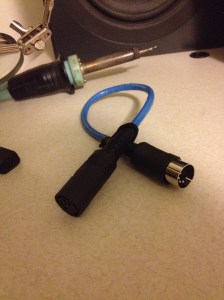
I ended up making the little dongle you see in the inset photo that adds the 1k resistor otherwise functions as a straight passthrough MIDI extension cable.
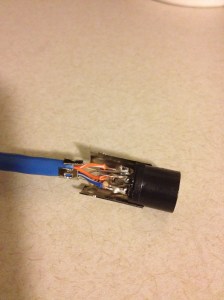
To make the cable I bought a pair of 180 degree DIN connectors, one male and one female. I soldered the 1k resistor across the data pins of the female connector since there was a little more room in the connector body for the resistor. I used a little piece of UTP ethernet cabling to connect things up. I have lots of this stuff around and it’s cheap even if you don’t.
Total cost was under 2USD, but I ended up making 2 bad cables along the way figuring this out. Hopefully this saves you that at least.